
Week 28: Debugging async behavior in effects
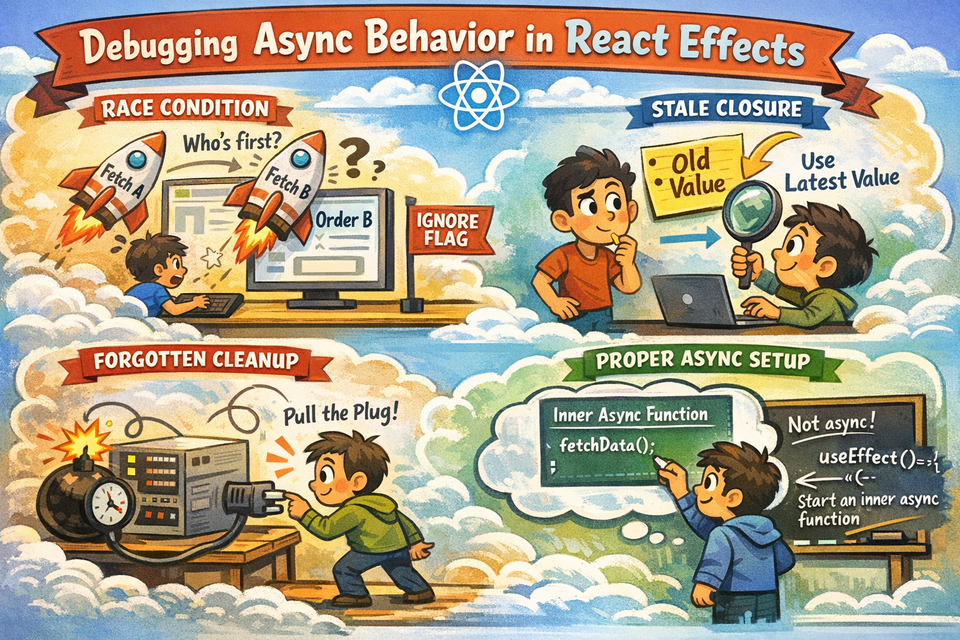
If you have been writing React for more than a week, you have probably done something like this:
useEffect(() => {
  async function fetchOrder() {
    const data = await getOrder(orderId);
    setOrder(data);
  }
  fetchOrder();
}, [orderId]);
It works. The order loads. You ship it. Two weeks later, a user reports that the wrong order details are flickering on screen before the correct one loads. Or worse — an order from a previous session is briefly visible to someone else. Welcome to the world of async bugs in useEffect.
This article is about understanding what actually happens when you run async code inside effects, what can go wrong, how to debug it, and how to write effects that are predictable, safe, and clean — using an Order Management System as our practical playground.
Why Async Inside Effects Is Tricky
React's useEffect runs after the render is committed to the screen. When your effect fires an async operation, React does not pause and wait for it. The component continues to live its life — re-rendering, unmounting, updating — while your await is still pending somewhere in JavaScript's event loop.
This creates a window of time where things can go wrong. Let's identify the three most common failure modes.
Failure Mode 1: The Stale Closure
Imagine a warehouse dashboard that shows pick-list details for a selected order. The user clicks on Order A, and before the fetch finishes, clicks on Order B. Now two fetches are in flight simultaneously. Whichever one resolves last wins — and that might be Order A, even though the user is clearly looking at Order B's screen.
This is called a race condition, and it is far more common than developers expect.
Project Setup
Let's build this from scratch so you can reproduce and fix it yourself.
oms-async-debugging/
├── src/
│   ├── api/
│   │   └── orders.js
│   ├── components/
│   │   ├── OrderList.jsx
│   │   └── OrderDetail.jsx
│   ├── App.jsx
│   └── index.js
├── package.json
package.json
{
  "name": "oms-async-debugging",
  "version": "1.0.0",
  "private": true,
  "dependencies": {
    "react": "^18.2.0",
    "react-dom": "^18.2.0",
    "react-scripts": "5.0.1"
  },
  "scripts": {
    "start": "react-scripts start"
  }
}
Run npx create-react-app oms-async-debugging and then replace the files below. Or simply create the project manually and paste the files.
📄 src/api/orders.js
// Simulated order database with intentional delay variation
const ORDERS = {
  "ORD-001": {
    id: "ORD-001",
    customer: "Alice Martin",
    status: "Processing",
    items: [
      { sku: "SKU-A1", name: "Wireless Headphones", qty: 1 },
      { sku: "SKU-B2", name: "USB-C Cable", qty: 3 },
    ],
    total: 89.97,
  },
  "ORD-002": {
    id: "ORD-002",
    customer: "Bob Singh",
    status: "Shipped",
    items: [{ sku: "SKU-C3", name: "Mechanical Keyboard", qty: 1 }],
    total: 149.99,
  },
  "ORD-003": {
    id: "ORD-003",
    customer: "Clara Johnson",
    status: "Delivered",
    items: [
      { sku: "SKU-D4", name: "Monitor Stand", qty: 2 },
      { sku: "SKU-E5", name: "Webcam", qty: 1 },
    ],
    total: 210.5,
  },
};

// Notice: ORD-001 takes longer (2s) to simulate a slow network response
export function fetchOrderById(orderId) {
  const delay = orderId === "ORD-001" ? 2000 : 500;
  return new Promise((resolve) => {
    setTimeout(() => {
      resolve(ORDERS[orderId] || null);
    }, delay);
  });
}

export const ORDER_IDS = Object.keys(ORDERS);
This is key: ORD-001 deliberately takes 2 seconds while the others take 0.5 seconds. This will make the race condition easy to reproduce manually.
📄 src/components/OrderList.jsx
import React from "react";
import { ORDER_IDS } from "../api/orders";

function OrderList({ selectedId, onSelect }) {
  return (
    <div style={styles.sidebar}>
      <h3 style={styles.heading}>📦 Orders</h3>
      {ORDER_IDS.map((id) => (
        <button
          key={id}
          onClick={() => onSelect(id)}
          style={{
            ...styles.orderBtn,
            background: selectedId === id ? "#1a73e8" : "#f1f3f4",
            color: selectedId === id ? "#fff" : "#333",
          }}
        >
          {id}
        </button>
      ))}
    </div>
  );
}

const styles = {
  sidebar: {
    width: "200px",
    padding: "16px",
    borderRight: "1px solid #ddd",
    display: "flex",
    flexDirection: "column",
    gap: "8px",
  },
  heading: { margin: "0 0 12px", fontSize: "16px", color: "#333" },
  orderBtn: {
    padding: "10px 14px",
    border: "none",
    borderRadius: "6px",
    cursor: "pointer",
    fontSize: "14px",
    textAlign: "left",
    fontWeight: "500",
  },
};

export default OrderList;
Now here is the buggy version of OrderDetail. Study this before looking at the fix.
📄 src/components/OrderDetail.jsx — BUGGY VERSION
import React, { useState, useEffect } from "react";
import { fetchOrderById } from "../api/orders";

// ⚠️ This component has a race condition bug
function OrderDetail({ orderId }) {
  const [order, setOrder] = useState(null);
  const [loading, setLoading] = useState(false);

  useEffect(() => {
    if (!orderId) return;

    setLoading(true);
    setOrder(null);

    async function loadOrder() {
      const data = await fetchOrderById(orderId); // no cleanup!
      setOrder(data);                              // might set stale data
      setLoading(false);
    }

    loadOrder();
  }, [orderId]);

  if (!orderId) return <div style={styles.placeholder}>← Select an order</div>;
  if (loading) return <div style={styles.placeholder}>Loading {orderId}...</div>;
  if (!order) return <div style={styles.placeholder}>Order not found.</div>;

  return (
    <div style={styles.card}>
      <h2 style={styles.orderId}>{order.id}</h2>
      <p style={styles.customer}>👤 {order.customer}</p>
      <span style={{ ...styles.badge, background: statusColor(order.status) }}>
        {order.status}
      </span>
      <hr style={styles.divider} />
      <h4 style={styles.itemsHeading}>Line Items</h4>
      {order.items.map((item) => (
        <div key={item.sku} style={styles.item}>
          <span>{item.name}</span>
          <span style={styles.qty}>× {item.qty}</span>
        </div>
      ))}
      <div style={styles.total}>Total: ${order.total.toFixed(2)}</div>
    </div>
  );
}

function statusColor(status) {
  return { Processing: "#f59e0b", Shipped: "#3b82f6", Delivered: "#10b981" }[status] || "#999";
}

const styles = {
  placeholder: { padding: "40px", color: "#999", fontSize: "16px" },
  card: { padding: "24px", maxWidth: "480px" },
  orderId: { margin: "0 0 4px", fontSize: "22px", color: "#1a73e8" },
  customer: { margin: "4px 0 10px", color: "#555" },
  badge: { padding: "4px 10px", borderRadius: "12px", color: "#fff", fontSize: "13px" },
  divider: { margin: "16px 0", border: "none", borderTop: "1px solid #eee" },
  itemsHeading: { margin: "0 0 8px", color: "#333" },
  item: { display: "flex", justifyContent: "space-between", padding: "6px 0", fontSize: "14px", color: "#444" },
  qty: { color: "#888" },
  total: { marginTop: "16px", fontWeight: "bold", fontSize: "16px", textAlign: "right" },
};

export default OrderDetail;
📄 src/App.jsx
import React, { useState } from "react";
import OrderList from "./components/OrderList";
import OrderDetail from "./components/OrderDetail";

function App() {
  const [selectedOrderId, setSelectedOrderId] = useState(null);

  return (
    <div style={styles.container}>
      <div style={styles.header}>
        <h1 style={styles.title}>OMS — Order Detail Viewer</h1>
        <p style={styles.subtitle}>
          Try clicking ORD-001, then quickly click ORD-002 to see the race condition.
        </p>
      </div>
      <div style={styles.layout}>
        <OrderList selectedId={selectedOrderId} onSelect={setSelectedOrderId} />
        <OrderDetail orderId={selectedOrderId} />
      </div>
    </div>
  );
}

const styles = {
  container: { fontFamily: "sans-serif", minHeight: "100vh", background: "#fafafa" },
  header: { background: "#1a73e8", color: "#fff", padding: "20px 32px" },
  title: { margin: 0, fontSize: "24px" },
  subtitle: { margin: "6px 0 0", fontSize: "14px", opacity: 0.85 },
  layout: { display: "flex", minHeight: "calc(100vh - 88px)" },
};

export default App;
📄 src/index.js
import React from "react";
import ReactDOM from "react-dom/client";
import App from "./App";

const root = ReactDOM.createRoot(document.getElementById("root"));
root.render(<React.StrictMode><App /></React.StrictMode>);
Run the app and try clicking ORD-001, then immediately clicking ORD-002. You will see "Loading ORD-002..." but then the page will populate with Alice Martin's data (ORD-001), because that slower fetch finished last and overwrote the state. That is your race condition live in the browser.
The Fix: Cleanup with an Ignore Flag
The standard and most compatible fix for this is an ignore flag inside the cleanup function. When React re-runs the effect (because orderId changed), it first calls the previous effect's cleanup. We use that moment to tell the in-flight fetch "even if you finish, don't bother setting state."
📄 src/components/OrderDetail.jsx — FIXED VERSION
import React, { useState, useEffect } from "react";
import { fetchOrderById } from "../api/orders";

function OrderDetail({ orderId }) {
  const [order, setOrder] = useState(null);
  const [loading, setLoading] = useState(false);

  useEffect(() => {
    if (!orderId) return;

    let ignore = false; // 🔑 The fix lives here

    setLoading(true);
    setOrder(null);

    async function loadOrder() {
      const data = await fetchOrderById(orderId);
      if (!ignore) {        // Only update state if this fetch is still "current"
        setOrder(data);
        setLoading(false);
      }
    }

    loadOrder();

    return () => {
      ignore = true;        // Cleanup: mark this effect's fetch as stale
    };
  }, [orderId]);

  if (!orderId) return <div style={styles.placeholder}>← Select an order</div>;
  if (loading) return <div style={styles.placeholder}>Loading {orderId}...</div>;
  if (!order) return <div style={styles.placeholder}>Order not found.</div>;

  return (
    <div style={styles.card}>
      <h2 style={styles.orderId}>{order.id}</h2>
      <p style={styles.customer}>👤 {order.customer}</p>
      <span style={{ ...styles.badge, background: statusColor(order.status) }}>
        {order.status}
      </span>
      <hr style={styles.divider} />
      <h4 style={styles.itemsHeading}>Line Items</h4>
      {order.items.map((item) => (
        <div key={item.sku} style={styles.item}>
          <span>{item.name}</span>
          <span style={styles.qty}>× {item.qty}</span>
        </div>
      ))}
      <div style={styles.total}>Total: ${order.total.toFixed(2)}</div>
    </div>
  );
}

function statusColor(status) {
  return { Processing: "#f59e0b", Shipped: "#3b82f6", Delivered: "#10b981" }[status] || "#999";
}

const styles = {
  placeholder: { padding: "40px", color: "#999", fontSize: "16px" },
  card: { padding: "24px", maxWidth: "480px" },
  orderId: { margin: "0 0 4px", fontSize: "22px", color: "#1a73e8" },
  customer: { margin: "4px 0 10px", color: "#555" },
  badge: { padding: "4px 10px", borderRadius: "12px", color: "#fff", fontSize: "13px" },
  divider: { margin: "16px 0", border: "none", borderTop: "1px solid #eee" },
  itemsHeading: { margin: "0 0 8px", color: "#333" },
  item: { display: "flex", justifyContent: "space-between", padding: "6px 0", fontSize: "14px", color: "#444" },
  qty: { color: "#888" },
  total: { marginTop: "16px", fontWeight: "bold", fontSize: "16px", textAlign: "right" },
};

export default OrderDetail;
Now click ORD-001, immediately click ORD-002 — you will see ORD-002's data correctly appear, no flicker, no ghost data. The slow ORD-001 fetch still completes, but ignore is already true so it silently discards its result.
Quick note on AbortController: Some tutorials recommend usingAbortControllerwith the fetch API to actually cancel the HTTP request. That's a valid approach too, especially for realfetch()calls. The ignore-flag pattern is simpler and works even with third-party API clients, Axios, or custom wrappers like ourfetchOrderByIdmock.
Failure Mode 2: Setting State on an Unmounted Component
Before React 18, this produced an actual warning in the console:
Warning: Can't perform a React state update on an unmounted component.
React 18 removed the warning (because it caused more confusion than it helped), but the underlying bug is still real: if your component unmounts while a fetch is in-flight and the fetch completes afterward, you will try to call setOrder() on a component that no longer exists in the tree. This can cause memory leaks and unexpected side effects.
The same ignore flag pattern from above fixes this entirely. When a component unmounts, React runs the cleanup function, sets ignore = true, and any pending fetch will hit the if (!ignore) guard and bail out safely.
Let's add an unmount demonstration to our app.
📄 src/components/OrderDetail.jsx — with unmount logging (add this temporarily for debugging)
Replace the loadOrder function body with this version:
async function loadOrder() {
  console.log(`[Effect] Fetching ${orderId}...`);
  const data = await fetchOrderById(orderId);

  if (ignore) {
    console.log(`[Effect] ${orderId} fetch finished but component moved on. Discarding.`);
    return;
  }

  console.log(`[Effect] ${orderId} fetch applied to state.`);
  setOrder(data);
  setLoading(false);
}
Open your browser's DevTools console, click rapidly between orders, and watch the logs. You will see exactly which fetches are discarded and which ones are applied. This is an excellent debugging technique when you are unsure which effect runs are "winning."
Failure Mode 3: The Missing Dependency Trap
This is the sneakiest one. Consider a shipment polling component that should refresh shipment status every 5 seconds, but only for the current warehouse zone.
📄 src/components/ShipmentPoller.jsx — BUGGY
import React, { useState, useEffect } from "react";
const SHIPMENT_STATUS = {
"ZONE-A": ["IN_TRANSIT", "OUT_FOR_DELIVERY", "DELIVERED"][Math.floor(Math.random() * 3)],
"ZONE-B": ["PROCESSING", "PICKED", "PACKED"][Math.floor(Math.random() * 3)],
};
function fetchShipmentStatus(zone) {
return new Promise((resolve) =>
setTimeout(() => resolve(SHIPMENT_STATUS[zone] || "UNKNOWN"), 800)
);
}
// ⚠️ Bug: zone is used inside the effect but missing from dependency array
function ShipmentPoller({ zone }) {
const [status, setStatus] = useState("—");
useEffect(() => {
const interval = setInterval(async () => {
const result = await fetchShipmentStatus(zone); // zone is stale here!
setStatus(result);
}, 5000);
return () => clearInterval(interval);
}, []); // ← Missing 'zone' in deps
return (
<div style={styles.poller}>
<strong>Zone:</strong> {zone} | <strong>Status:</strong> {status}
</div>
);
}
const styles = {
poller: {
padding: "12px 20px",
background: "#e8f0fe",
borderRadius: "8px",
margin: "16px 0",
fontSize: "14px",
color: "#333",
},
};
export default ShipmentPoller;The problem: the interval was created with a closure over the initial value of zone. Even if the parent passes a new zone prop, the interval's callback still refers to the old one. This is a stale closure — one of the most common and confusing bugs in React.
The Fix:
useEffect(() => {
  const interval = setInterval(async () => {
    const result = await fetchShipmentStatus(zone);
    setStatus(result);
  }, 5000);

  return () => clearInterval(interval);
}, [zone]); // ✅ Now the effect re-runs and creates a fresh interval whenever zone changes
Adding zone to the dependency array means React will tear down the old interval and create a new one every time zone changes. Your callback will always reference the latest zone.
If you find yourself fighting dependency arrays constantly, it is usually a sign that your data fetching logic would be better handled by a tool like React Query or SWR — both of which handle caching, retries, and polling automatically. We covered both in Article #26 — SWR / React Query for Fast Cached Data Fetching.
Putting It All Together: A Robust OMS Dashboard
Let's build a final, complete, production-quality component that combines all three lessons: ignore flag for race conditions, proper cleanup for unmounting, and a correct dependency array for polling.
📄 src/components/OrderDashboard.jsx
import React, { useState, useEffect, useCallback } from "react";
import { fetchOrderById, ORDER_IDS } from "../api/orders";

// Simulated shipment status fetcher
function fetchShipmentStatus(orderId) {
  const statuses = ["IN_TRANSIT", "OUT_FOR_DELIVERY", "PICKED", "PACKED", "DELIVERED"];
  return new Promise((resolve) =>
    setTimeout(
      () => resolve(statuses[Math.floor(Math.random() * statuses.length)]),
      600
    )
  );
}

function OrderDashboard() {
  const [selectedId, setSelectedId] = useState(null);
  const [order, setOrder] = useState(null);
  const [orderLoading, setOrderLoading] = useState(false);
  const [shipmentStatus, setShipmentStatus] = useState("—");
  const [pollCount, setPollCount] = useState(0);

  // Effect 1: Load order details — race condition safe
  useEffect(() => {
    if (!selectedId) {
      setOrder(null);
      return;
    }

    let ignore = false;
    setOrderLoading(true);
    setOrder(null);

    async function loadOrder() {
      const data = await fetchOrderById(selectedId);
      if (!ignore) {
        setOrder(data);
        setOrderLoading(false);
      }
    }

    loadOrder();
    return () => { ignore = true; };
  }, [selectedId]);

  // Effect 2: Poll shipment status every 4 seconds — correct deps
  useEffect(() => {
    if (!selectedId) return;

    setShipmentStatus("—");
    setPollCount(0);

    const interval = setInterval(async () => {
      const status = await fetchShipmentStatus(selectedId);
      setShipmentStatus(status);
      setPollCount((c) => c + 1);
    }, 4000);

    return () => clearInterval(interval);
  }, [selectedId]); // ✅ Correct dependency

  return (
    <div style={styles.dashboard}>
      <h2 style={styles.heading}>OMS — Live Dashboard</h2>

      {/* Order Selector */}
      <div style={styles.selectorRow}>
        {ORDER_IDS.map((id) => (
          <button
            key={id}
            onClick={() => setSelectedId(id)}
            style={{
              ...styles.pill,
              background: selectedId === id ? "#1a73e8" : "#e8eaed",
              color: selectedId === id ? "#fff" : "#333",
            }}
          >
            {id}
          </button>
        ))}
      </div>

      {/* Order Detail Panel */}
      <div style={styles.panel}>
        {!selectedId && <p style={styles.hint}>Select an order above to begin.</p>}
        {selectedId && orderLoading && (
          <p style={styles.loading}>⏳ Loading order {selectedId}...</p>
        )}
        {order && !orderLoading && (
          <>
            <div style={styles.orderHeader}>
              <div>
                <h3 style={styles.orderId}>{order.id}</h3>
                <p style={styles.customer}>👤 {order.customer}</p>
              </div>
              <span
                style={{
                  ...styles.badge,
                  background: statusColor(order.status),
                }}
              >
                {order.status}
              </span>
            </div>

            <div style={styles.itemsSection}>
              <h4 style={styles.sectionTitle}>Line Items</h4>
              {order.items.map((item) => (
                <div key={item.sku} style={styles.lineItem}>
                  <span>{item.name}</span>
                  <span style={styles.qty}>× {item.qty}</span>
                </div>
              ))}
              <div style={styles.total}>
                Order Total: <strong>${order.total.toFixed(2)}</strong>
              </div>
            </div>

            <div style={styles.shipmentBox}>
              <h4 style={styles.sectionTitle}>📡 Live Shipment Status</h4>
              <p style={styles.statusText}>{shipmentStatus}</p>
              <p style={styles.pollInfo}>Polls completed: {pollCount}</p>
            </div>
          </>
        )}
      </div>
    </div>
  );
}

function statusColor(status) {
  return (
    { Processing: "#f59e0b", Shipped: "#3b82f6", Delivered: "#10b981" }[status] || "#888"
  );
}

const styles = {
  dashboard: { fontFamily: "sans-serif", padding: "32px", maxWidth: "640px", margin: "0 auto" },
  heading: { fontSize: "22px", color: "#1a1a2e", marginBottom: "20px" },
  selectorRow: { display: "flex", gap: "10px", marginBottom: "24px" },
  pill: {
    padding: "8px 18px",
    borderRadius: "20px",
    border: "none",
    cursor: "pointer",
    fontWeight: "600",
    fontSize: "13px",
    transition: "all 0.2s",
  },
  panel: {
    background: "#fff",
    border: "1px solid #e0e0e0",
    borderRadius: "12px",
    padding: "24px",
    minHeight: "240px",
  },
  hint: { color: "#aaa", textAlign: "center", marginTop: "60px" },
  loading: { color: "#888", textAlign: "center", marginTop: "60px" },
  orderHeader: { display: "flex", justifyContent: "space-between", alignItems: "flex-start" },
  orderId: { margin: "0 0 4px", fontSize: "20px", color: "#1a73e8" },
  customer: { margin: 0, color: "#555", fontSize: "14px" },
  badge: { padding: "4px 12px", borderRadius: "12px", color: "#fff", fontSize: "12px", fontWeight: "600" },
  itemsSection: { marginTop: "20px" },
  sectionTitle: { margin: "0 0 10px", fontSize: "14px", textTransform: "uppercase", letterSpacing: "0.05em", color: "#888" },
  lineItem: { display: "flex", justifyContent: "space-between", padding: "7px 0", fontSize: "14px", borderBottom: "1px solid #f5f5f5" },
  qty: { color: "#aaa" },
  total: { marginTop: "12px", textAlign: "right", fontSize: "15px", color: "#333" },
  shipmentBox: {
    marginTop: "20px",
    background: "#f0f4ff",
    borderRadius: "8px",
    padding: "16px",
  },
  statusText: { fontSize: "18px", fontWeight: "bold", color: "#1a73e8", margin: "4px 0" },
  pollInfo: { fontSize: "12px", color: "#888", margin: 0 },
};

export default OrderDashboard;
Now update App.jsx to use this dashboard:
📄 src/App.jsx — Final version
import React from "react";
import OrderDashboard from "./components/OrderDashboard";

function App() {
  return (
    <div style={{ background: "#f7f8fa", minHeight: "100vh", paddingTop: "40px" }}>
      <OrderDashboard />
    </div>
  );
}

export default App;
Debugging Async Effects: A Quick Reference
Here is a mental checklist to run through whenever you have unexpected async behavior in an effect:
1. Is there a race condition? Ask: "Can this dependency change while the fetch is in flight?" If yes, add the ignore flag + cleanup.
2. Is there a stale closure? Ask: "Does my effect's callback use any variable from outside it?" If yes, make sure that variable is in the dependency array. Tools like eslint-plugin-react-hooks will catch this automatically — use it.
3. Is there a missing cleanup? Ask: "Does my effect create a timer, subscription, or open connection?" If yes, the cleanup function must cancel/clear it.
4. Am I using async directly on the effect function? Don't do this:
js
// ❌ Wrong
useEffect(async () => {
  const data = await fetchSomething();
}, []);
useEffect expects the function to return either nothing or a cleanup function. An async function always returns a Promise. React will silently ignore it and your cleanup will never run. Always define an inner async function and call it, exactly as shown in our examples above.
5. React Strict Mode fires effects twice in development React 18's Strict Mode intentionally mounts, unmounts, and remounts your components in development. This means your effects run twice. If your ignore flag and cleanup are correct, this will be invisible and harmless. If they are not, Strict Mode will surface the bug in development before it reaches production. This is a feature, not a bug.
Connecting This to Your OMS Architecture
In a real Order Management System, async bugs in effects are not just annoying — they can cause genuine business problems. Imagine a warehouse picker who's screen flickers between two orders during a pick-list load, and accidentally scans items for the wrong order. Or a customer service agent who sees stale shipment status and tells a customer the wrong information.
These are exactly the scenarios that make understanding async effect behavior so important beyond just "making the tests pass."
If you want to avoid writing ignore flags everywhere, consider moving your data-fetching entirely out of useEffect and into React Query or SWR — as we explored in Article #26. Both libraries handle race conditions, deduplication, and cleanup for you automatically. But knowing why they do what they do — which is exactly what this article covered — will make you a much more effective developer when things go wrong.
For global state patterns around fetched data, revisit Article #16 — Server vs Client State Management. And if the dependency array is still giving you trouble, go back to the foundational Article #10 — useEffect with Dependencies and Cleanup.
Summary
Here's what we learned today:
Race conditions happen when multiple async operations can resolve in unpredictable order. Fix them with an ignore flag and a cleanup function that sets it to true.
Unmount leaks happen when a component disappears while a fetch is in-flight. The same ignore flag pattern protects against this too.
Stale closures happen when your effect's callback captures an outdated value of a prop or state variable. Fix them by listing that variable in the dependency array.
Never make the effect callback itself async. Always define an inner async function inside the effect and call it.
What's Next?
In the next article, we'll explore Suspense for Data and Code Splitting — React's built-in way to handle loading states declaratively and split your JavaScript bundle so users only download what they need. If you've ever wondered how to make your OMS dashboard load faster and feel smoother, that one's for you. Stay tuned!
Member discussion