
Week 27 Error boundaries and fallback UIs
If you've been building along with this series, you've learned how to fetch orders with Fetch API and Axios, cache them smartly with SWR and React Query, and manage state at both local and global levels. But here's the uncomfortable truth that every production developer eventually faces:
Things will break in the browser. Components will throw. And when they do, without a safety net, your entire UI crashes.
In a consumer app, a crash is annoying. In an Order Management System — where warehouse staff are processing hundreds of shipments, finance teams are reconciling invoices, and customer service is looking up order histories — a crash is a serious operational problem.
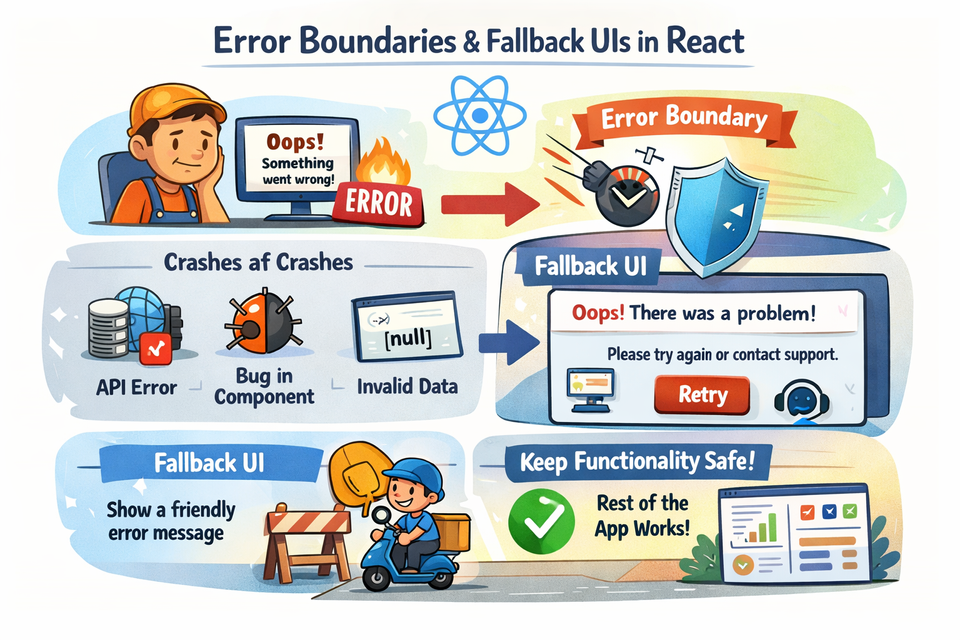
That's exactly what Error Boundaries are for. They are React's built-in way to catch runtime JavaScript errors in the component tree and show a fallback UI instead of a blank screen. Think of them as a try-catch block, but for your React component tree.
In this article, we'll go deep into Error Boundaries with real OMS examples you can run locally, look at how to design meaningful fallback UIs, and explore how React 18's improvements make this even smoother.
Why Do Components Crash?
Before building the solution, let's understand the problem. Components can crash at runtime for many reasons:
- An API returns an unexpected shape (e.g.,
order.customer.namewhencustomerisnull) - A third-party library throws unexpectedly
- A rendering calculation divides by zero or calls a method on
undefined - A prop that was supposed to be an array turns out to be
null
Here's a simple example in an OMS context. Imagine you're rendering an order's shipping address:
// 📄 src/components/ShippingAddress.js

function ShippingAddress({ order }) {
  // If order.address is undefined, this will throw!
  return <p>{order.address.street}, {order.address.city}</p>;
}
If the API returns an order where address is null, this component throws a TypeError: Cannot read properties of null (reading 'street'). Without an Error Boundary, React unmounts the entire component tree and you get a blank white screen. Your users see nothing. They don't know what happened.
What Is an Error Boundary?
An Error Boundary is a React class component that implements one or both of these lifecycle methods:
static getDerivedStateFromError(error)— updates state to trigger a fallback rendercomponentDidCatch(error, errorInfo)— lets you log the error to an error reporting service
Error Boundaries catch errors during:
- Rendering
- Lifecycle methods
- Constructors of child components
They do not catch errors in:
- Event handlers (use regular try-catch for those)
- Asynchronous code like
setTimeoutorfetch(those need their own error handling — see our article on Fetch API and Axios error handling) - Server-side rendering
- Errors in the Error Boundary itself
Note: As of today, Error Boundaries must be class components. There's no hooks-based equivalent in React's official API, but we'll look at a clean wrapper pattern so you can use them alongside functional components with ease.
Project Setup
Let's build a runnable OMS dashboard that demonstrates Error Boundaries in action. We'll use json-server for a mock API just like in our previous articles.
Step 1: Create the project
npx create-react-app oms-error-boundary
cd oms-error-boundary
npm install -g json-server
Step 2: Create the mock database
📄 db.json (project root)
{
  "orders": [
    {
      "id": 1001,
      "customer": "Alice Martin",
      "status": "Processing",
      "total": 249.99,
      "address": { "street": "12 Oak Lane", "city": "New York" }
    },
    {
      "id": 1002,
      "customer": "Bob Singh",
      "status": "Shipped",
      "total": 89.00,
      "address": null
    },
    {
      "id": 1003,
      "customer": "Carol Wu",
      "status": "Delivered",
      "total": 512.50,
      "address": { "street": "88 Maple Ave", "city": "San Francisco" }
    }
  ],
  "inventory": [
    { "id": 1, "sku": "SKU-001", "name": "Running Shoes", "stock": 45 },
    { "id": 2, "sku": null, "name": "Winter Jacket", "stock": 12 },
    { "id": 3, "sku": "SKU-003", "name": "Leather Belt", "stock": 0 }
  ]
}
Notice order 1002 has address: null and inventory item 2 has sku: null. These are our intentional "bad data" records that will trigger crashes — just like in the real world.
Start the mock server:
json-server --watch db.json --port 3001Building the Error Boundary Component
This is the core piece. Let's build a reusable Error Boundary component.
📄 src/components/ErrorBoundary.js
import React from 'react';

class ErrorBoundary extends React.Component {
  constructor(props) {
    super(props);
    this.state = {
      hasError: false,
      error: null,
    };
  }

  // This fires when a child throws during rendering
  static getDerivedStateFromError(error) {
    return { hasError: true, error };
  }

  // This is where you'd log to Sentry, Datadog, etc.
  componentDidCatch(error, errorInfo) {
    console.error('ErrorBoundary caught an error:', error, errorInfo);
  }

  handleReset = () => {
    this.setState({ hasError: false, error: null });
  };

  render() {
    if (this.state.hasError) {
      // If the parent passed a custom fallback, use it
      if (this.props.fallback) {
        return this.props.fallback(this.state.error, this.handleReset);
      }

      // Default fallback UI
      return (
        <div style={styles.errorBox}>
          <h3 style={styles.title}>⚠️ Something went wrong</h3>
          <p style={styles.message}>
            This section failed to load. Please try again or contact support.
          </p>
          <button style={styles.button} onClick={this.handleReset}>
            🔄 Try Again
          </button>
        </div>
      );
    }

    return this.props.children;
  }
}

const styles = {
  errorBox: {
    border: '1px solid #fca5a5',
    background: '#fef2f2',
    borderRadius: '8px',
    padding: '1.5rem',
    margin: '1rem 0',
    textAlign: 'center',
  },
  title: {
    color: '#dc2626',
    marginBottom: '0.5rem',
  },
  message: {
    color: '#6b7280',
    fontSize: '0.9rem',
  },
  button: {
    marginTop: '0.75rem',
    padding: '0.5rem 1rem',
    background: '#2563eb',
    color: 'white',
    border: 'none',
    borderRadius: '6px',
    cursor: 'pointer',
    fontSize: '0.9rem',
  },
};

export default ErrorBoundary;
This component:
- Maintains
hasErrorstate — initially false, set to true when a child throws - Accepts a
fallbackprop — a render function so parents can customize the error UI - Has a
handleResetmethod — so users can retry without refreshing the page - Logs the error — ready to plug into any error monitoring service
Real OMS Example: Shipping Address Widget
Now let's create a component that intentionally crashes on bad data — mimicking what happens when an OMS API returns a null address.
📄 src/components/ShippingAddress.js
function ShippingAddress({ order }) {
  // This will throw a TypeError if order.address is null
  const { street, city } = order.address;

  return (
    <div style={{
      background: '#f0f9ff',
      border: '1px solid #bae6fd',
      borderRadius: '6px',
      padding: '0.75rem 1rem',
      marginTop: '0.5rem',
    }}>
      <strong>📍 Ship To:</strong> {street}, {city}
    </div>
  );
}

export default ShippingAddress;
📄 src/components/OrderCard.js
import ErrorBoundary from './ErrorBoundary';
import ShippingAddress from './ShippingAddress';

function OrderCard({ order }) {
  return (
    <div style={{
      border: '1px solid #e5e7eb',
      borderRadius: '8px',
      padding: '1rem',
      marginBottom: '1rem',
      background: 'white',
    }}>
      <h3 style={{ margin: '0 0 0.5rem' }}>
        Order #{order.id} — <span style={{ fontWeight: 'normal', color: '#6b7280' }}>{order.customer}</span>
      </h3>
      <p style={{ margin: '0.25rem 0', color: '#374151' }}>
        Status: <strong>{order.status}</strong> | Total: <strong>${order.total.toFixed(2)}</strong>
      </p>

      {/*
        Wrap just the ShippingAddress — not the entire card!
        This is the key insight: scope your Error Boundaries tightly.
      */}
      <ErrorBoundary
        fallback={(error, reset) => (
          <div style={{
            background: '#fef9c3',
            border: '1px solid #fde047',
            borderRadius: '6px',
            padding: '0.6rem 1rem',
            marginTop: '0.5rem',
            fontSize: '0.85rem',
            color: '#713f12',
          }}>
            ⚠️ Address unavailable for this order.{' '}
            <button
              onClick={reset}
              style={{ background: 'none', border: 'none', color: '#1d4ed8', cursor: 'pointer', textDecoration: 'underline' }}
            >
              Retry
            </button>
          </div>
        )}
      >
        <ShippingAddress order={order} />
      </ErrorBoundary>
    </div>
  );
}

export default OrderCard;
This is the key architectural lesson here: wrap only the part that might fail, not the entire component. Order 1001 and 1003 show their addresses perfectly. Only order 1002 — the one with address: null — shows the yellow warning. The rest of the card still renders without any issue.
Another Example: Inventory SKU Renderer
Let's build a second crashed component to drive this home. This one is for an inventory panel.
📄 src/components/InventoryItem.js
function InventoryItem({ item }) {
  // This throws if item.sku is null — calling .toUpperCase() on null
  const displaySku = item.sku.toUpperCase();

  return (
    <div style={{
      display: 'flex',
      justifyContent: 'space-between',
      alignItems: 'center',
      padding: '0.6rem 1rem',
      borderBottom: '1px solid #f3f4f6',
    }}>
      <span>{item.name}</span>
      <span style={{ fontFamily: 'monospace', color: '#6b7280' }}>{displaySku}</span>
      <span style={{
        color: item.stock === 0 ? '#ef4444' : '#10b981',
        fontWeight: 'bold',
      }}>
        {item.stock === 0 ? 'Out of Stock' : `${item.stock} units`}
      </span>
    </div>
  );
}

export default InventoryItem;
📄 src/components/InventoryPanel.js
import { useState, useEffect } from 'react';
import ErrorBoundary from './ErrorBoundary';
import InventoryItem from './InventoryItem';

function InventoryPanel() {
  const [items, setItems] = useState([]);
  const [loading, setLoading] = useState(true);

  useEffect(() => {
    fetch('http://localhost:3001/inventory')
      .then((res) => res.json())
      .then((data) => {
        setItems(data);
        setLoading(false);
      });
  }, []);

  if (loading) return <p style={{ padding: '1rem' }}>⏳ Loading inventory...</p>;

  return (
    <div style={{
      border: '1px solid #e5e7eb',
      borderRadius: '8px',
      overflow: 'hidden',
      background: 'white',
    }}>
      <div style={{ background: '#1e3a5f', color: 'white', padding: '0.75rem 1rem' }}>
        <strong>📦 Inventory Status</strong>
      </div>
      {items.map((item) => (
        /*
          Each item is wrapped in its OWN Error Boundary.
          So if item #2 crashes, items #1 and #3 still render fine.
        */
        <ErrorBoundary
          key={item.id}
          fallback={() => (
            <div style={{
              padding: '0.6rem 1rem',
              borderBottom: '1px solid #f3f4f6',
              color: '#dc2626',
              fontSize: '0.85rem',
            }}>
              ❌ Failed to render item: {item.name} (SKU data missing)
            </div>
          )}
        >
          <InventoryItem item={item} />
        </ErrorBoundary>
      ))}
    </div>
  );
}

export default InventoryPanel;
This is a powerful pattern. By wrapping each list item in its own Error Boundary, you ensure that a single bad record doesn't break the entire inventory panel. Users see 2 out of 3 items rendering correctly, with a clear inline message for the broken one.
Putting It All Together
📄 src/components/OrderList.js
import { useState, useEffect } from 'react';
import OrderCard from './OrderCard';

function OrderList() {
  const [orders, setOrders] = useState([]);
  const [loading, setLoading] = useState(true);

  useEffect(() => {
    fetch('http://localhost:3001/orders')
      .then((res) => res.json())
      .then((data) => {
        setOrders(data);
        setLoading(false);
      });
  }, []);

  if (loading) return <p style={{ padding: '1rem' }}>⏳ Loading orders...</p>;

  return (
    <div style={{ padding: '1rem' }}>
      <h2 style={{ marginTop: 0 }}>🛒 Order Management</h2>
      {orders.map((order) => (
        <OrderCard key={order.id} order={order} />
      ))}
    </div>
  );
}

export default OrderList;
📄 src/App.js
import OrderList from './components/OrderList';
import InventoryPanel from './components/InventoryPanel';
import ErrorBoundary from './components/ErrorBoundary';

function App() {
  return (
    <div style={{
      fontFamily: 'sans-serif',
      maxWidth: '900px',
      margin: '0 auto',
      background: '#f9fafb',
      minHeight: '100vh',
    }}>
      {/* Top-level Error Boundary as the last line of defense */}
      <ErrorBoundary>
        <header style={{
          background: '#1e3a5f',
          color: 'white',
          padding: '1rem 1.5rem',
          marginBottom: '1.5rem',
        }}>
          <h1 style={{ margin: 0 }}>🏭 OMS Dashboard — Error Boundaries Demo</h1>
        </header>

        <div style={{ display: 'grid', gridTemplateColumns: '1fr 1fr', gap: '1rem', padding: '0 1rem' }}>
          <div>
            {/* Section-level Error Boundary around the orders panel */}
            <ErrorBoundary
              fallback={(error, reset) => (
                <div style={{
                  padding: '1.5rem',
                  background: '#fef2f2',
                  border: '1px solid #fca5a5',
                  borderRadius: '8px',
                  textAlign: 'center',
                }}>
                  <p>⚠️ Orders section failed to load.</p>
                  <button onClick={reset} style={{ padding: '0.5rem 1rem', cursor: 'pointer' }}>
                    Retry
                  </button>
                </div>
              )}
            >
              <OrderList />
            </ErrorBoundary>
          </div>

          <div>
            {/* Section-level Error Boundary around the inventory panel */}
            <div style={{ padding: '1rem' }}>
              <h2 style={{ marginTop: 0 }}>🏪 Inventory</h2>
              <ErrorBoundary>
                <InventoryPanel />
              </ErrorBoundary>
            </div>
          </div>
        </div>
      </ErrorBoundary>
    </div>
  );
}

export default App;
Run the app with:
bash
npm start(Keep json-server running in a separate terminal.)
What you'll see:
- Order #1001 (Alice) — renders perfectly with a shipping address
- Order #1002 (Bob) — order card renders, but the address area shows a yellow warning
- Order #1003 (Carol) — renders perfectly with a shipping address
- Inventory panel — items 1 and 3 render fine; item 2 (missing SKU) shows an inline error message
The Layer Cake: Nesting Error Boundaries
The most important architectural decision with Error Boundaries is where to place them. Think in layers:
App (top-level boundary — last resort)
  └── OrdersSection (section-level boundary)
        └── OrderCard (card-level boundary)
              └── ShippingAddress (component-level boundary)
Each layer catches errors at its scope. If ShippingAddress crashes, the card-level boundary handles it. The section still works. The inventory panel still works. Your app is still alive.
This is exactly how well-architected OMS systems think about resilience — isolate failures, keep the rest of the system running, surface the problem clearly without cascading.
Designing Meaningful Fallback UIs
A fallback UI is not just about "not crashing." It's about giving your users the right information to take the right action. Here are three levels of fallback quality:
❌ Bad Fallback
<ErrorBoundary fallback={() => <div>Error</div>}>No context. No action. Users have no idea what failed or what to do.
🟡 Okay Fallback
<ErrorBoundary fallback={() => <p>Something went wrong. Please refresh the page.</p>}>Better, but forcing a full page refresh loses all user context and is lazy UX.
✅ Great Fallback
<ErrorBoundary
  fallback={(error, reset) => (
    <div style={styles.errorBox}>
      <h4>⚠️ Shipping address could not be loaded</h4>
      <p>This might be a data issue with Order #{order.id}. You can retry or contact the OMS admin.</p>
      <div style={{ display: 'flex', gap: '0.5rem', justifyContent: 'center' }}>
        <button onClick={reset}>🔄 Retry</button>
        <button onClick={() => window.open('/support')}>📞 Contact Support</button>
      </div>
    </div>
  )}
>
This gives: context (which widget failed), the likely cause, and two clear actions. This is what production OMS dashboards should do.
A Note on React 18 and Suspense Integration
React 18 introduced better integration between Error Boundaries and Suspense. You can now use an Error Boundary to catch both rendering errors and Suspense-based errors (like a lazy-loaded component failing to load) in one wrapper:
import { lazy, Suspense } from 'react';
import ErrorBoundary from './components/ErrorBoundary';

const HeavyAnalyticsPanel = lazy(() => import('./components/HeavyAnalyticsPanel'));

function App() {
  return (
    <ErrorBoundary>
      <Suspense fallback={<p>Loading analytics...</p>}>
        <HeavyAnalyticsPanel />
      </Suspense>
    </ErrorBoundary>
  );
}
In this pattern:
Suspensehandles the loading state (while the chunk downloads)ErrorBoundaryhandles the error state (if the chunk fails to load or throws on render)
This pairs naturally with the code splitting we explored in Dynamic Routing and Code Splitting.
Event Handler Errors: The One Thing Error Boundaries Can't Catch
This trips up almost every developer new to Error Boundaries. Consider this:
function CancelOrderButton({ orderId }) {
  const handleCancel = () => {
    // If this throws, ErrorBoundary WON'T catch it
    throw new Error('Cancel API failed');
  };

  return <button onClick={handleCancel}>Cancel Order</button>;
}
Error Boundaries only catch errors during rendering, not during event handler execution. For event handlers, you handle errors the traditional way:
function CancelOrderButton({ orderId }) {
  const [error, setError] = useState(null);

  const handleCancel = async () => {
    try {
      await fetch(`/api/orders/${orderId}/cancel`, { method: 'POST' });
    } catch (err) {
      setError('Failed to cancel order. Please try again.');
    }
  };

  return (
    <>
      <button onClick={handleCancel}>Cancel Order</button>
      {error && <p style={{ color: 'red', fontSize: '0.85rem' }}>{error}</p>}
    </>
  );
}
Keep this boundary (pun intended) clear in your mind: rendering errors → Error Boundary, event/async errors → try-catch and local state.
File Structure Summary
Here's a quick reference for every file we created in this article:
oms-error-boundary/
├── db.json                              ← Mock database (project root)
├── src/
│   ├── App.js                           ← Root component with top-level boundary
│   └── components/
│       ├── ErrorBoundary.js             ← Reusable Error Boundary class component
│       ├── OrderList.js                 ← Fetches and lists all orders
│       ├── OrderCard.js                 ← Individual order card with section boundary
│       ├── ShippingAddress.js           ← Intentionally crashes on null address
│       ├── InventoryPanel.js            ← Fetches and lists inventory items
│       └── InventoryItem.js             ← Intentionally crashes on null SKU
Key Takeaways
- Error Boundaries are class components that wrap part of your component tree and catch render-time errors from their children.
- Scope them tightly — wrap individual widgets, not entire pages, so one failure doesn't take down everything else.
- Provide meaningful fallback UIs — tell users what failed, why it might have failed, and what they can do next.
- Use the
fallbackprop pattern to make your Error Boundary reusable and customizable across the app. - Event handler errors are your responsibility — Error Boundaries can't help there. Use try-catch and local state.
- Pair with Suspense for lazy-loaded components to cleanly separate loading states from error states.
In an Order Management System context, this is not just good React practice — it's a reliability requirement. Warehouse operators, logistics coordinators, and finance teams cannot afford blank screens. Error Boundaries let you build systems that degrade gracefully rather than fail catastrophically.
Up Next
In the next article, we'll explore Debugging Async Behavior in Effects — a topic that's tripped up even experienced React developers. We'll look at common patterns where useEffect and async data fetching produce surprising bugs, and how to reason through and fix them systematically.
If you haven't already, check out our earlier articles on useEffect with Dependencies and Cleanup and SWR & React Query for Cached Data Fetching — they'll give you great context heading into the next one.
Stay curious, and keep shipping! 🚀
Member discussion